
Gravity drainage networks
Create circular-pipe gravity drainage networks of pipes and structures.
Lay out gravity networks from points, polylines or 3D linework, grade whole runs against cover limits, edit levels in a table and check every clash and clearance. Hydrology scenarios and SWMM hydraulic runs keep each result tied to its design.
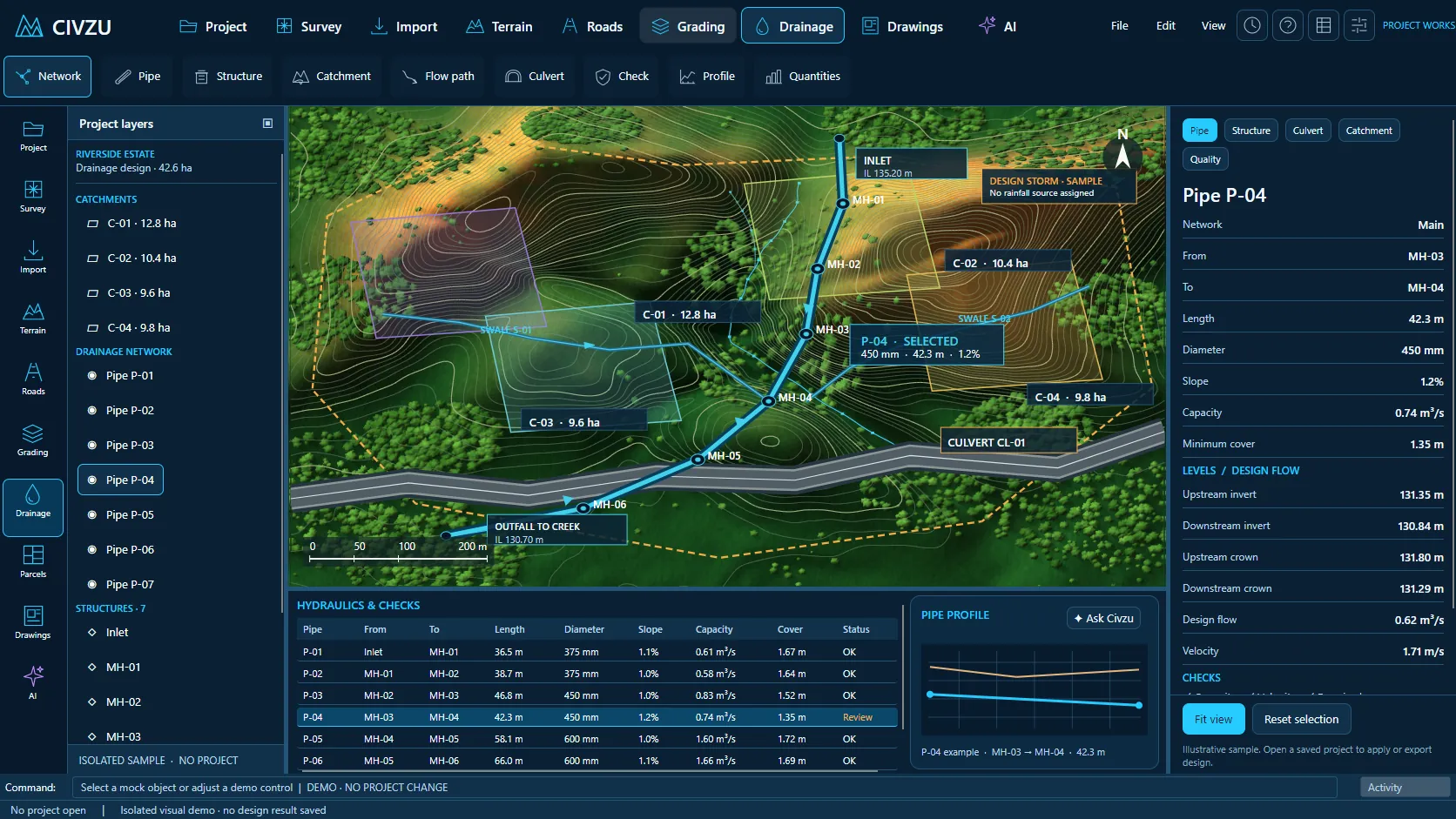 APP CAPTURE · ILLUSTRATIVE PROJECT
Your engineers work in the desktop workbench; your agent reaches the same project through typed local tools. Items tagged In development are being built now.
Create circular-pipe gravity drainage networks of pipes and structures.
Lay a pipe from a polyline, with structures at each end and grade from the start invert.
Create structures at points and pipes between them at a set depth.
Tables of pipe and structure properties.
Copy pipe runs as parallel offset networks.
Connect services with wye, tee or saddle fittings instead of artificial manholes.
Pipe-to-pipe connection fittings as network nodes, included in quantities and hydraulics.
Straighten pipes, or lay curved pipes as chords within a stated tolerance.
Find orphaned pipes and structures and remove or reconnect them.
Lay pipes along 3D linework or saved feature lines, taking levels where they cross structure walls.
Insert a structure into a pipe at a chosen chainage.
Edit a run's inverts as an ID-keyed table, pasting values back from a spreadsheet.
Grade pipe runs through fixed start, end and internal inverts.
Edit pipe grades and inverts.
Match outgoing pipes to incoming inverts, crowns or centrelines along a run, with stated drops.
Grade runs at constant slope with structure drops.
Set run grades from minimum cover below the surface and check maximum cover.
Raise, lower or interpolate levels along pipe runs.
Export and re-import run inverts as ID-keyed CSV; formulas are refused, not evaluated.
Report geometric bend and elbow angles in pipe runs.
Reverse pipe flow direction.
Substitute pipe sizes and materials.
Record sump depth and grate, cover and frame descriptions on structures.
Rename pipes from the structures they connect.
Quantity schedules for pipes and structures.
Earth trench cross-sections along pipe runs.
Rock trench cross-sections.
Trench widths and depths that vary along the run.
Bedding, surround and backfill layers in trench sections.
Insulation components in trench takeoffs.
Lay out and check clearances for several utilities in one trench.
Generate trench corridors along straight runs.
Quick approximate trench quantity estimates.
Detailed sectional trench quantities with your declared factors.
Reconcile quantities where vertical-box trenches intersect.
Calculate trench excavation limits.
Extract construction lines from trench designs for review.
Find pipe-to-pipe interferences.
Check separation between pipes and existing services in 3D.
Check required horizontal separation, with table and CSV/XLSX export.
Check required vertical separation between utilities.
Analyse pipe cover along the network.
Describe each utility crossing pair.
Run named clash reviews in the desktop app and select objects over MCP.
Save separation rules and existing services in the check definition.
Locate the nearest points and clearance between pipes.
Select clash issues directly in plan, profile and 3D views.
Mark clash issues reviewed, accept exceptions with a reason, reopen them and keep history.
Re-run clash reviews after edits, keeping decisions where evidence is unchanged.
Export separation and clash-review tables to CSV and XLSX.
Each clash rule records its source and severity rationale.
“Lay a stormwater run along these manhole points at 1.2 m depth and grade it under the surface with 900 mm minimum cover.”
“Check the revised layout for clashes with the water main and list every one with its depth.”
“Run the 1 in 10 year scenario through SWMM and summarise the surcharged pipes.”
Reserve your early-access seat. We confirm your MCP client, seat count and commercial details before access opens.
Reserve your seat ↗